So, in my last post, I explained that I have a new Adsense account and some of the things I am doing differently to keep it. One of those things I am doing is trying to be less aggressive in my Adsense placement. Having an extemely high Click Through Rate can be one reason why an account could get shut down.
However, another reason is click bombing. I don’t think I was a victim of a click bomb attack, but I really don’t know. A click bomb attack is essentially where a bot or malicious person repeatedly clicks the ads on your site, which can negatively affect your account standing with Google.
I believe that Google does have some measures in place to try and mitigate this from occurring; however, there are still plenty of stories out there of people getting their account shut down for this reason. One well documented occurrence was on Acme.com here. Jef was lucky to have Matt Cutts chime in and others to get his account reinstated; most of us humans will never get that kind of attention.
For this reason, I think doing all that you can to prevent malicious click attacks is a good idea. I’ve taken a look at a few different Click Bomb Prevention plugins, and I wanted to share my thoughts on each of them.
Ad Logger Plugin
First up is a free option called Ad Logger. This plugin does several things; however, one of those functions is that it can stop showing ads if too many clicks take place in a short period of time. This is exactly what we are looking for here.
However, the downside is that it only works if you use Ad Injection 1.2.0.4+ to insert your Adsense Ads. I don’t use Ad Injection, so it doesn’t help me personally. However, this is worth a look as its free and does what needs to be done to prevent excessive clicking. As they state, “This feature uses JavaScript and cookies, so it won’t function if these are turned off, of if your website readers turn their cookies off.”
The other word of caution is that it has only received 2.5 out of 5 stars and hasn’t been updated in a year.
Who Sees Ads Plugin
Another free option is the Ozh’ Who Sees Ads Plugin. This is actually a pretty powerful plugin that gives you all kinds of options for displaying or not displaying your ads. Here are all the functions that you can set from within the plugin:
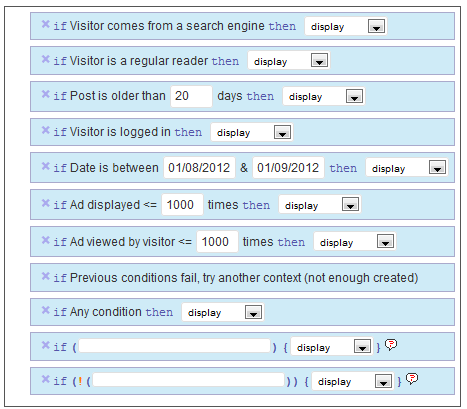 So, you can select to only show ads to search engine visitors, or return visitors, or both. You can also set how many ad views the visitor can have before the ads stop displaying. This is a great way to prevent click bombing.
Overall, I like the plugin. It hasn’t been updated in over 2 years, so that’s an issue – but from my tests, it still works. However, the downside is how to use the code it generates. Its time consuming and can be difficult to get your ads to display where you want them to. This could be a deal killer for many people.
So here’s how it works. Once you set all your conditions (see image above), and input your adsense code (or other advertising code), then you get a snippet of code, such as this: <!--wsa:contentads-->. Then you have to take that code and insert it into your posts where you want your ads to display. This can be cumbersome and time consuming, especially if you want your ads to float left or right. You will have to dive into the PHP code from your wordpress editor if you want to do that on all posts at once.
I tried to insert the code into the Quick Adsense plugin, but the ads did not display – so that option won’t work.
Overall, its a very cool plugin and from my tests it still works even though its old. But getting your ads to display in the locations where you want them will take quite a bit of time and effort, and may not even be possible if you are unfamiliar with PHP.
Clickbomb Defense Plugin
My final clickbomb prevention plugin was created by a NichePursuits reader, Scott Frye! Scott contacted me a while ago and gave me some insights into his plugin. Clickbomb Defense is a plugin that makes it very easy to specify the number of pageviews that each visitor can have before your ads are no longer displayed.
I’ve tested the plugin out pretty thoroughly, and it works great. In a nutshell, here’s what you need to do once you’ve installed the plugin:
- Insert your adsense code for and select locations to display ads.
- Insert a secondary code for when your Adsense is no longer displaying (optional).
- Specify the number of page views each visitor is allowed to view your ads (this will prevent repeatedly clicking).
- Specify whether to display ads to all visitors, or only those coming from search engines or other specified sites.
Overall, its pretty simple to use and it works as advertised. I’ve tested it out without any hassle. In addition, I’ve exchanged a few emails with Scott (the creator of the plugin) and he’s very responsive and willing to help or listen to suggestions.
To show you how it works, I made a quick video review:
This plugin is not free, but its a very reasonable price. And you can also use it on an unlimited number of sites, so its truly a one-time purchase. If you are interested, you can check out the Clickbomb Defense Plugin here.
Yes, these are affiliate links and I will make a commission if you decide to purchase. If you do, I appreciate the value you’ve placed on my recommendation and the time I’ve put into reviewing these different plugins to make your life a little easier. This plugin is not required for everyone, and you may be able to get by with the free options that I mentioned as well.
But overall for ease of use and effectiveness – Clickbomb Defense is the best plugin I’ve seen to prevent clickbombing.
Your Thoughts
Overall, I’ve shared a few plugins that I have found that can help prevent clickbombing. I think each of these plugins has some great features. What do you think? Have you used any of these plugins and what’s been your experience? Do you have any other methods for preventing click bombing?
http://www.nichepursuits.com/clickbomb-defense-3-plugins-to-prevent-clickbombing/#

0 comments:
Post a Comment