I often get asked to share what the best WordPress themes for creating a niche site that gets great adsense click through rates (CTRs). I usually try to explain that Click through rate (CTR) is less about the theme typically and more about the Google Adsense Placement (or other monetization ads) and less about the theme.
Yes, some themes have the Adsense placement built in, but using plugins and widgets you can essentially put Adsense ads anywhere you want on your site no matter what theme you are using. (If you want to know how to insert link units under the navigation bar – watch my video post here). This is why I tell people that I literally try to use a different theme for almost all of my niche sites – because I can place the Adsense ads where I want theme very quickly and easily no matter what the theme is. In addition, using a new theme for each site helps them look more original.
So, in my opinion, much more important that knowing the “best Adsense themes” is knowing the PRINCIPLES of where to place your ads. I am going to show you 5 quick examples of some different adsense layouts that I have used in the past. But even more important than that is to try and understand WHY I put the ads where they are. Then you can literally come up with hundreds of different ad placements, sizes, colors, or other combinations to create your own unique sites and ad placement.
In a nutshell, here are the principles that you need to consider when you are trying to optimize your CTR.
- Ads “above the fold” will have a better click-through rate than ads below the fold.
- Place ads near where visitors eyeballs naturally go to in order to get the best CTR (top left, near titles, near site navigation, etc).
Knowing where visitors tend look first on your sites can help you determine where to place ads to get the most attention (if that’s what you are going for of course). You can find all sorts of “heatmaps” that show you where users look first of spend most of their time on sites. From looking at these and from my experience, I would say that users tend to look first at the Top Left part of the page (probably because we are all trained to read the text of a book from the top left and then move down). In addition, big bolded items such as post titles also get attention. Finally, navigation bars at the top or in the sidebars are also used frequently by people because this is how a traditional site is set up.
Okay, now that you have the principles of where you should be placing Ads for maximum Click through rate, I want to give you some specific adsense layout examples.
Adsense Layout 1
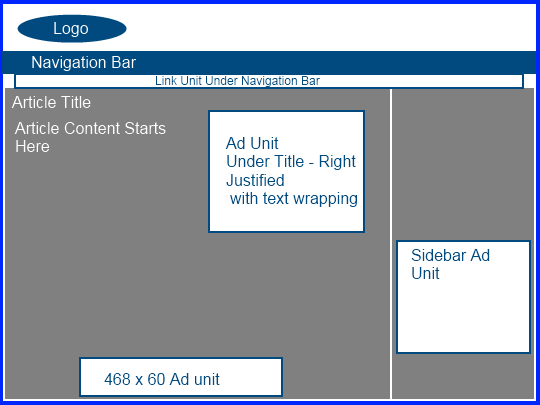
This is a fairly non-aggressive Ad placement that may not get the highest CTR in the world, but still is an overall good site layout. The ad unit under the article title could be a large rectangle, medium rectangle, or other size. My favorites to use here are the 300 x 250 or the 336 x 280. The sidebar unit could also be a number of ad sizes just depending on the width of your sidebar itself. This will be the case will all of the adsense layouts discussed here – multiple adsense sizes could be utilized with these placements. These just give you a general idea of where ads could be placed.
Adsense Layout 2
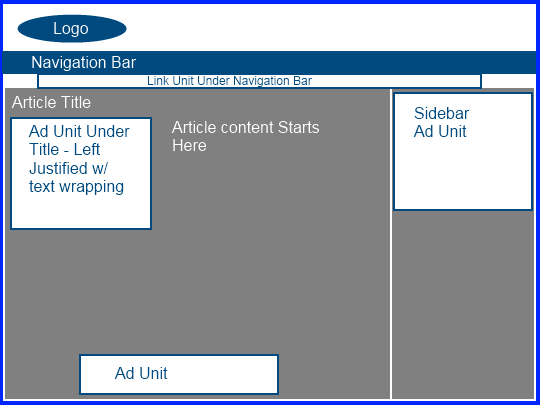
To be honest, this is a layout that I use alot on my sites. The primary ad unit within the content is above the fold and gets a lot of clicks because the eyeballs tend to go to the top left of the website. In addition, the sidebar at the top fits well because its not sitting right next to another ads – its separated by the primary content of the page.
Adsense Layout 3
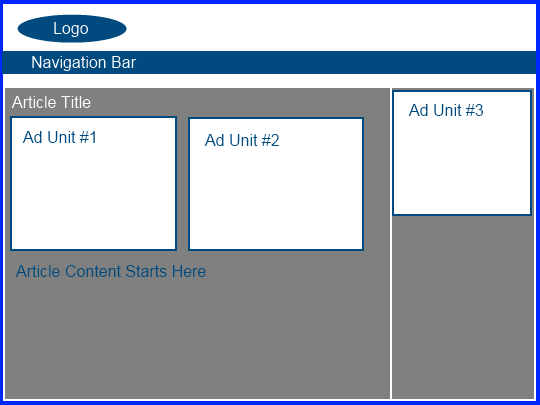 This is an extremely aggressive adsense layout. I personally don’t use this layout, but I expect it would get an extremely good CTR. In addition, I want to point out that another popular layout is one that removes Ad Unit #2. I often see adsense sites with what is shown above minus ad unit #2 – still agressive, but slightly less so.
Adsense Layout 4
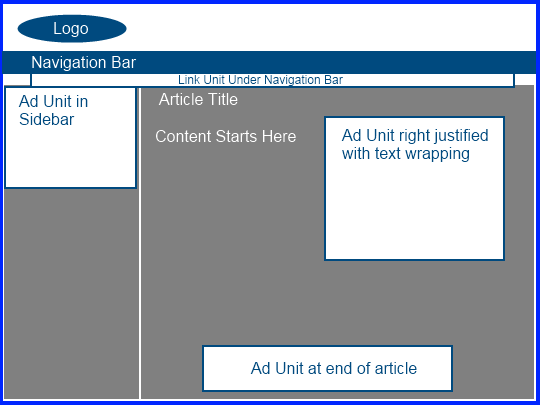 This layout is very similar to Layout 1 with just the sidebar on the left. The advantage of this again is that the eyeballs of people visiting your site naturally look to the top left. Even more so, the sidebar on the left is often where the navigation of the site is located so they will look here to scroll to other pages. Perhaps they will see an ad that interests them?
Adsense Layout 5
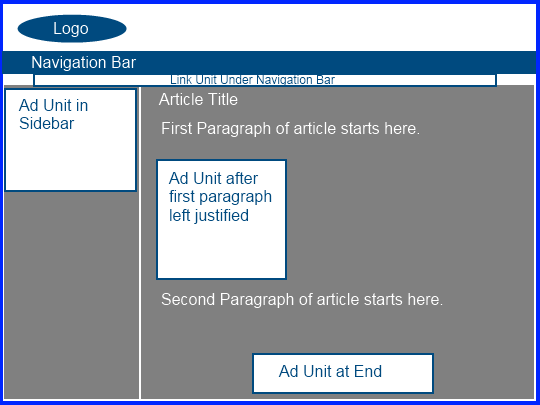 This is an interesting ad layout because it is set up to display the ads after the first paragraph of the article. So, this is less aggressive than layout 3 for example, but would still get a very good CTR because the ads are still above the fold, in the content, and left justified. Overall, its still obviously an aggressive ad layout but is certainly still within Google’s TOS.
My Caveats About the Layouts
I literally could have created probably a hundred different layouts of potential places to insert ad units. I could have created a layout with 2 sidebars with one on the left and one on the right. I could have given examples of 2 sidebars both on the same side (either right or left); or lots of other site structures. Then obviously there are hundreds of combinations of ad sizes, exact placement, and options of using 1, 2, or 3 units in the content. Hopefully these 5 simple ad layout examples will allow you to come up with your own based on the principles I have discussed here.
I also want to point out that you don’t have to use Link units on all your sites under the navigation bar – I just showed that here because it was easier. If you are not comfortable doing that – then don’t! Or if you want to use MORE link units than I showed here either in the sidebar or in the content, then by all means go right ahead. Just be sure to read up on Google’s policies for the total number of ad units that you are allowed to use.
Overall, the purpose here was to show you a few layouts that will get good click through rates. Most importantly, you need to consider what the strategy or YOUR business is and whether or not a more or less aggressive ad layout is more appropriate.
Your Thoughts
I am interested in hearing what you have to say about these 5 simple layouts. Are any of these ad layouts that you have used in the past or would consider using on your sites? What additional thoughts do you have to add about getting optimal click through rates?
http://www.nichepursuits.com/5-simple-adsense-layout-examples-for-increasing-click-through-rates/#

0 comments:
Post a Comment