Wednesday, June 19, 2013

Top Affiliate Clickbank 2010 dari Indonesia

Top Affiliate Clickbank 2010 dari Indonesia ternyata ada 3 orang. Mereka adalah Rully Kustandar, Andi Perdana dan Dicky Mario Purba. Untuk terpilih menjadi Top Affiliate Clickbank tidaklah mudah, karena ada persyaratan khusus, yaitu minimal penghasilan kotor tertentu di tahun yang sebelumnya, tingkat refund dari produk yang di jual, tidak terindikasi spam dan partisipasi aktif dalam komunitas Clickbank.

Dari ketiga peraih top affiliate clickbank 2010 tersebut hanya Rully Kustandar yang rela menampilkan screenshotnya di akun facebooknya. Ya, penghasilan kotor yang diperoleh selama tahun 2010 adalah US$223.242,43 (setara dengan Rp2.009.181.870). Kalau di buat rata-rata, berarti tiap bulan dari Clickbank saja menghasilkan passive income Rp167.431.823. Dan yang sungguh mengagumkan adalah penghasilan perhari Rp5.581.061.

Top affiliate clicbank 2010 lainnya Andi Perdana dan Dicky Mario Purba hanya menampakkan sertifikat pengakuan sebagai ClickBank's Top Affiliates In 2010. Meskipun tidak ada screenshot penghasilan yang diperoleh selama tahun 2010, tapi penghasilan mereka berdua tentunya tidak berbeda jauh dengan penghasilan Rully Kustandar. Tidak jauh dari US$200.000.

Sebagai bagian dari Bangsa Indonesia, tentunya prestasi ini sangatlah membanggakan, kita sepatutnya merasa bangga bahwa di dunia Internet Marketing pun, sebenarnya Internet Marketer dari Indonesia juga mendapatkan pengakuan Internasional. Rully Kustandar, Andi Perdana dan Dicky Mario Purba telah membuktikannya.

Maju terus Internet Marketer Indonesia !

Sumber : http://donlotlah.blogspot.com/2011/04/top-affiliate-clickbank-2010-dari.html

Ryan Eagle, Hidup dan Matinya, Yang Saya Tahu

ryan-eagle-hidup-matiSeperti yang kita semua ketahui, EWA dan BLAM ADS telah tiada. Banyak affiliates nya yang tidak terbayarkan, dan memancing emosi banyak pihak. Tulisan ini tidak akan memperbincangkan hal yang kita semua sudah tahu itu. Tetapi saya akan berusaha memotret hal-hal yang mungkin cuma saya yang tahu, atau paling tidak, dari sudut pandang yang saya mengerti.

Cerita Ryan Eagle sekarang ini mengingatkan saya kepada cerita Donald Trump beberapa tahun yang lalu. Donald Trump, miliuner, beberapa tahun yang lalu dinyatakan gagal dan hampir bangkrut oleh beberapa bank. Dalam perjalanannya, Donald Trump dengan segala kesalahan yang diperbuatnya, termasuk dengan prinsip-prinsip yang dipegangnya; tidak berlari menjauh, justru menghadapi bank-bank tersebut dengan kepala tegak. Hasilnya, bank-bank itu menggelontorkan lagi kreditnya. Faktanya adalah : Kalau Mr Trump dinyatakan bangkrut maka tidak akan ada uang masuk balik ke bank; tetapi apabila diberikan pinjaman lagi, biarkan dia berbisnis, maka dengan kemampuan dan pengalamannya, masih ada kemungkinan uang dari bank ini akan balik lagi.

Well, oke, gak bisa dibandingkan antara Donald Trump dan Ryan Eagle. Kenyataan bahwa Ryan Eagle, melalui EWA Network, belum membayar affiliates nya adalah riil. Sebagai orang Indonesia yang dekat dengannya, saya merasakan keterlibatan yang dalam secara emosional dengan kejadian ini.

Ryan Eagle is Ryan Eagle. Seorang pebisnis yang berpikir seperti seorang pebisnis. Reputasinya yang jatuh terjerembab tidak membuatnya menyerah kepada keadaan. Ketika Ryan datang ke Indonesia tahun lalu, ratusan orang menyaksikan bagaimana dia berbicara dengan penuh passion, penuh keindahan tentang bisnis CPA, bahkan memberikan pengetahuan yang sangat berguna ketika berada dalam MasterClass Meet-up di Bebek Bengil Restoran Jakarta maupun pada saat Meet-up di Akmani Hotel. Memang tidak semua yang datang dapat langsung menikmati manfaatnya – karena tidak semuanya langsung action juga – tetapi kedatangan Ryan memunculkan antusiasme internet marketer Indonesia terhadap ‘binatang’ baru yang bernama CPA. Dan seperti pepatah, ilmu itu tidak akan luntur biarpun sebilah pedang dikalungkan di leher. Ilmu dari Ryan Eagle akan kita bawa selama hayat dikandung badan.

Kedatangan Ryan Eagle tahun lalu adalah interaksi langsung (secara fisik) pertama saya dengannya. Selama 4 hari penuh saya menemani Ryan berkeliling Jakarta, makan bersama teman-teman dari Medan, Surabaya, Jogja, Bali di Bandar Jakarta dan tertawa lepas ketika sahabat saya Dicky Mario Purba, dari Medan, membuat pesta ulang tahun kejutan. Ryan, dengan gayanya, meniup lilin dan memainkan kembang api yang khusus dibawa dari dapur untuknya. We’re having a lot of fun that night!

Selama 4 hari itu saya mengerti bahwa EWA adalah hidup matinya Ryan Eagle. Kecintaannya kepada perusahaan ini telah menyita semua rasa cintanya kepada hal-hal lain. Ryan bercerita bagaimana memulai semuanya dengan Google Adsense terus menjadi super affiliates dan kemudian mendirikan EWA bersama dengan sahabatnya, Harrison Gervitz. Bagaimana dia bekerja 16-18 jam sehari untuk berkomunikasi dengan karyawannya di seluruh dunia. Masih inget quote ini : “Hard Work! It always pays off ”- yang dia tuliskan untuk sahabat saya Patria ‘Ryan’ Primandita, mematahkan prinsip saya untuk selalu “work smart instead of work hard’ hehehehe..

Mata Orang Sukses Tidak Akan Berbohong

Satu hal yang saya ‘amaze’ sama makhluk yang satu ini adalah semangatnya yang luar biasa. Bagaimana Ryan bisa sangat bersemangat (matanya selalu berbinar-binar apabila menjabat sangat seseorang untuk pertama kalinya). Gaya jalannya sangat khas. Ketika kami semua sudah tepar kecapekan menemaninya, Ryan masih saja berbicara berapi-api mengenai keinginannya untuk mengeksplorasi Jakarta lebih banyak lagi. Bener, gak ada capeknya orang satu ini. Pak Rully Kustandar, Albert, Stanley dan Ricky menjadi saksi hidup semangat Ryan yang luar biasa. Kami pernah tertawa terbahak-bahak ketika Ricky bilang,” Man, this guy is a real legend!”.

Dibalik itu semua, banyak hal yang tidak diketahui oleh khalayak. Ryan Eagle sama sekali tidak minum alkohol dan juga tidak merokok. Dia mengakui bahwa dalam hidupnya ada fase ketika dia bisa melakukan apa saja dan drugs serta alkohol adalah temannya sehari-hari. Secara jantan dia menceritakan kalau hidupnya pernah hampir berakhir karena pengaruh drug yang begitu mendalam. But he got though that. He survived. Kami, selayaknya karena mendapatkan tamu Bule, menawarkan minuman beralkohol atau wine untuk kenyamanannya tapi Ryan menolak. Dia memilih kopi. Lots of coffee :)

Saya juga mengerti betul bahwa Ryan Eagle sangat rajin mengikuti Retreat Keagamaan yang diselenggarakan oleh lingkungannya. Beberapa kali Ryan posting di instagram mengenai kegiatannya yang satu ini. Ryan sangat bangga terhadap komunitas Retreatnya. Ini adalah, menurutnya, caranya mem-balance hidupnya. Termasuk ketika mendirikan EWAKids dan menjadi bagian dari organsasi Freemason. Yes, Ryan Eagle is a Freemason. Dan dia dengan sukses menceritakan kepada saya, bahwa anggapan banyak orang mengenai Freemason selama ini sudah diputarbalikkan untuk kepentingan golongan tertentu. Inti Freemason, menurutnya, adalah menolong orang lain dan mengutamankan Tuhan diatas segalanya. Saya sih manggut-manggut saja.

Bertemu dengan Ryan Eagle personally banyak membuka mata saya akan banyak hal. ‘Kesombongan’nya di social media; tentang bagaimana mobil mewahnya yang berjejer, atau rumahnya yang mewah; sama sekali tidak tercermin di kehidupannya yang sebenarnya. Ryan Eagle is a humble person – seorang yang rendah hati dan selalu berusaha untuk menghormati bumi dimana dia berpijak. Berulang kali dia menanyakan ke saya (apabila ingin melakukan sesuatu), apakah seperti ini boleh di Indonesia, ataukah tidak. Contohnya adalah ketika header grup Indonesia Internet Marketers yang tadinya bergambar palu arit (karena ketidaktahuannya mengenai sejarah bangsa kita) dan ketika saya memberitahu yang sebenarnya, serta merta Ryan meminta maaf dan menggantikannya dengan gambar yang ada sekarang ini.

Ah, ini hanya gambaran yang saya dapat mengenai Ryan. Tidak ada maksud untuk membela atau menjerumuskan siapa-siapa. Tulisan ini sepenuhnya berdasarkan kepada pengalaman saya berinteraksi dengannya. Kalau anda mempunyai pengalaman yang berbeda, tentu saja diperbolehkan.

Itulah Ryan Eagle. Pemilik EWA Network. Well, dulu pemilik EWA Network. Saya yakin, pemilik perusahaan CPA lain akan serta merta melarikan diri apabila menghadapi permasalahan yang EWA hadapi sekarang ini. Tetapi Ryan Eagle tidak. Dia tetap ada, mengakui kesalahannya dan tidak pernah lelah mencari jalan keluar untuk permasalahan ini. Saya yakin diusianya yang masih sangat muda ini, 25 tahun, Ryan Eagle telah mengalami banyak hal yang tidak pernah kita alami sebelumnya. We never been on his shoes, and we will never be. Kejadian ini aka menambah determinasi dan pengalamannya dalam mengelola sebuah perusahaan. Saya masih yakin suatu saat Ryan Eagle akan bangkit lagi; bahkan lebih kuat dari sebelumnya.

After all, sebagai sesama pebisnis, saya mengerti betul bahwa tidak ada bisnis yang tidak mempunyai resiko. Shit happens. Perusahaan naek dan turun. Begitu juga hidup kita : Kadang di atas, kadang di bawah. Bagi saya, tidak ada rasa malu untuk belajar dari Ryan Eagle (secara dia lebih muda). Despite of, bagaimana kondisi EWA sekarang ini, Ryan Eagle adalah entrepreneur sejati, yang tidak akan menyerah kepada keadaan. Come on birdman! You can do it!

Sumber : http://bixbux.com/ryan-eagle-hidup-dan-matinya-yang-saya-tahu/

Monday, June 17, 2013

Top Resources for Affiliate Marketers

When creating an affiliate site, you’ll need certain tools.  Just like any project, you need to choose the right tool for the job.

That’s why we’re sharing our favorites here.  We don’t list anything here that we don’t use ourselves, or that our professional affiliate marketing friends don’t use.

Search Engine Optimization

WordTracker
WordTracker is an industry standard when it comes to Keyword Research and Link Building.  Their system is top notch and has been around for years.  The professionals at WordTracker are constantly upgrading their software to include new, powerful features and they continually provide helpful tutorials and instructions on how to best utilize their services for your benefit.  This is a service that every professional SEO firm and super Affiliate has — and comes highly recommended.

RavenTools
Sometimes when a software or tool tries to solve many problems, the product lacks a lot of functionality or features when you compare rivals that solve only one problem and solve it well.  That’s not the case with RavenTools.  This is, hands-down, the best full-features SEO Tool that has been created to date.

SpyFu
Although the name may sound a little silly, this software is powerful.  SpyFu is well known for its intelligence gathering and ability to identify opportunities for affiliate marketers.  Better still, SpyFu is an amazing tool that lets you spy on your competition.  The general idea is that if you can see what is working for your competition, you can copy their strategies without wasting a lot of effort on your own trial and error!

Knowem
Knowem will register your username across hundreds of social media sites — so it was designed for social media and protecting your brand.  However, a killer side-effect of this service, is that you can build huge backlinks from authority websites when you create profiles on these social media properties.  So, enjoy the benefit of having your username consistent across hundreds of social media sites, enjoy the convenience of creating these profiles with ease — and love the great backlinks that will boost your natural search rankings!

ScribeSEO
When you’re writing articles or blog posts, you write for your audience — humans.  That’s the first and most important thing to do when writing.  However, you need to be sure that you’re feeding the Search Engines what they need to be sure that your content is properly indexed and found in search results!  With ScribeSEO, a plugin for WordPress, you’ll know exactly how well you’re writing for search engines – in real time!

AutoResponder Software

Aweber
Everyone in this space uses Aweber.  It’s that simple.  Why?  Because the software gets the job done.  The software is easy to setup, implement and use.  And, at the end of the day, when it comes to autoresponder software, your email messages MUST make it to the inbox of your subscribers.  With aweber’s long-standing reputation as a white-hat operator, your messages stay out of the junk mail folder.

Pop Up Software

Pop Up Domination
Okay, many of us hate intrusive pop ups — I know I do.  But, let’s be honest — they work.  However, that doesn’t mean your popups have to be obnoxious to work.  In fact, they should be gorgeous.  Well, we’ve found that Popup Domination excels at creating beautiful hover-type pop up forms, that are easy to create, and simple to implement.  It is a wordpress plugin, so if you’re running your affiliate site without wordpress, then skip this software.

Action Popup
This is my new favorite pop up software for wordpress.  It’s super simple to implement, and the popup ads are equally gorgeous as those found in Popup Domination.  My favorite features of this software is that it includes two additional plugins, “Action Opt In” and “Action Comments”.  With these two additional plugins, you can complete your email capture needs with multiple opt-in sources.  1) Action Popup creates the gorgeous popups with simplicity.  2) Action Opt In integrates a sidebar widget so non-subscribers see an opt in form, while current subscribers see “thanks for subscribing”.  3)  Action Comments integrates with wordpress commenting system, so anyone who comments on your blog gets subscribed to your email list, too!  Highly Recommended.

Membership Software

Wishlist Member
If you have a wordpress site, and want to implement a membership strategy, then WishList Member is your answer.  It’s a wordpress plugin, and it can easily protect content for unlimited membership levels, and has a very intuitive and easy-to-understand interface.  I bought the unlimited license, but you can start with a single domain license if you just want to test it out.

WordPress Themes

Smart affiliates use WordPress to power their websites.  To make these websites look, feel, and perform as desired – smart affiliates buy premium themes.  These are my favorite WP Themes for Affiliate Marketers!

Thesis Theme
It’s widely known that thesis theme for wordpress has taken on this space by storm.  Affiliates love it, and search engines love how easy it is to find and spider content.  After you buy thesis, if you want any support, you can use their support or do what I do:  Simply search google for “WordPress thesis (enter your question here)” — chances are, someone has already written a tutorial.

Optimize Press
I used OptimizePress to redesign AffPlan.com!  I’ve also used it to create my membership site called Content Buffet.  This theme is amazing!

I am no designer.  I can’t even open photoshop.  But I do know the importance of quality design and a gorgeous website.  OptimizePress makes this easy.  Highly, Highly Recommended!  Buy OptimizePress.

WP Review Engine
Want to make a great Review Site?  Look no further.  WP Review Engine makes it easy to create a review site that allows you (and your users) rate products and services.  It is designed for Affiliate Marketers, so all the products and services that you review on your site is linking through your affiliate links.

Premium WP Theme Galleries

When selecting premium WordPress Themes, you can choose a solid platform like Thesis Theme, or an amazing theme like OptimizePress to make your site look gorgeous with ease — or, you may need something that’s a bit more designed for your specific needs.

That’s where Premium WP Theme Galleries come in.

You can either buy one-off Premium Themes from their huge library of Premium WP Themes, or you can join their sites and pay a membership fee to get access to all of them.  These are my favorites!

Theme Forest
ThemeForest is a marketplace for themes and designs.  You simply find the design or theme you like, and buy it.  You can see how many others have purchased the theme before you.

Woo Themes
Woo Themes has hundreds of themes to choose from, and they add at least 2 new themes each month.  You can buy one theme at a time, or simply pay a low monthly subscription fee to access everything!

Rocket Theme
RocketTheme has templates for many different CMS platforms, like WordPress, Joomla and Drupal.  With all of the platforms they service, it may feel a little confusing.  However, their themes are really impressive!

Premium WordPress Themes, Plugins, Support and Resources

WPMU
This is crazy awesome.  I really love WPMU and have been a member for 2 years straight, and have no intention of cancelling.  Just check it out, and you’ll see what I mean.  With a membership, you get unlimited access to their premium themes, plugins and support forums.  They specialize in working with WP Multi User (hence the name “WPMU”).  Further, their plugins and themes work seamlessly with BuddyPress, so you can create a website that has full Social Network Functionality!

I can’t say enough about WPMU.  Their themes, plugins and support help you build and manage lucrative blog networks, directories, user-generated content and so much more!  I simply highly recommend it.

Social Media – Twitter Promotions

Tweet Adder
If you want to get targeted Twitter Followers, you can do it manually.  But if you want to ramp up your twitter follower numbers, and automate a lot of the busy work associated with identifying, following, vetting and engaging with these followers, then you need a tool that is designed to to just that.  Tweet Adder is the premiere Twitter Marketing Tool and has been successfully used by thousands of marketers (and a lot of my good friends!).

Social Media – FaceBook Promotions

WP FacePages
When you create a business Page on FaceBook, you need more than a simple presence.  You need your FB Pages to “work” for you.  To do so, you can either buy services that charge you monthly, or you can power it all yourself.  I use WP FacePages.  It’s a wordpress plugin that seamlessly connects to unlimited FB Pages and powers your “locked” content management, your optin boxes and so much more.

Web Hosting Companies

I have used many web hosting companies over the years.  They all offer the same general services.  However, I prefer A2Hosting and BlueHost for their excellent support and their extremely competitive hosting fees.  (By “Extremely Competitive”, I mean “downright cheap!”)

I recommend both of these hosting companies equally.  They are cheap and provide great quality services!

A2Hosting
A2Hosting is located near my hometown, in Ann Arbor Michigan.  Oddly, I didn’t know of them until I was recommended to try them when I wanted to diversify my hosting providers.  I love them!  When I have any support issues, I get to a quality support technician without any delay — 24 hours a day.

BlueHost
BlueHost was my first hosting provider and has never let me down.  They offer crazy-cheap hosting services and excellent support.

Domain Registrars

GoDaddy
I’ve used Godaddy for years, and I think their services are good.  However, I must warn you that they offer a lot of upsells during the registration process that you probably do NOT need.  So, when you buy domains through GoDaddy, like I do, simply skip all the upsells and only buy the domains.  You can add services later, if you need them.  (NOTE:  I use GoDaddy only for domain registration.  I do NOT use their web hosting services, email services or anything else — just their domain registration services.)

Source : http://bit.ly/126Vopd

Thursday, May 23, 2013

WordPress plugins are important for SEO Blog


In the blogging world, millions of blogs in cyberspace competing for the first prize in the Google search engines by applying the rules of SEO on his blog. SEO techniques are basically divided into two parts namely SEO on page and off page SEO
In this article, I   will discuss the 2 plugins in the category of on page SEO that you must install to increase your SEO ranking and how to install and setup further

I feel no need to explain again what it is and what it's WordPress plugin because I'm sure you already know once the above two terms. Build quality blog is a difficult challenge, there are many factors that influence it, and SEO is one of the factors that is no less important. Among the bloggers themselves be no division of opinion, some bloggers believe that by mastering SEO then the blog will be many visitors who can then provide financial benefits. But some other bloggers have different opinions, for they only need a complementary SEO, the most important nan foremost it should be highlighted in a content or content is, after the appearance of the blog. Unfortunately most of them tend to fall asleep on one alone.

Then where I had to stand impartially? I tend to prefer standing in the middle of those two opinions, for I SEO is important and especially content is also very important. For that if you just build a blog, you should open your mind, learn SEO and improve your content, I think it is the best combination.

To support your SEO techniques, necessary tool and this time I will give feedback in the form of two pieces of plugins that you must have to boost your blog's ranking in search engines.

Plugin All in One SEO Pack

Plugin All in One SEO Pack function helps you set up the blog title, description and keywords correctly. With the blog title, description and keywords are correct, it will automatically improve the quality of your blog's SEO. You no longer need to be involved in the process of coding modifications that risk damaging the display because with this plugin you can do such as typing in MS Word, the remaining system will process.

Installation and Setup

Go to your blog dashboard and hover over the menu Plugins> Add New, after the page opens click menu Popular.
image
Scroll your mouse and find the plugin All in One SEO Pack and then click Install, click Yes when the system prompts for confirmation.

image

It takes a few seconds to complete the installation process, once completed and you find a page with a view like below, now you click Activate Plugin.
image

Once the plugin is activated, you must make arrangements in advance so that the plugin can work according to function, at the top of your blog will look red notification indicating that plugin All in One Seo Pack is not fully working, click the admin page to enter more further settings .
image

For the plugin settings, note the details in this step so that no one, first on the plugin status select Enable. At Home Title please fill in the box with keywords and add the name of the site with interspersed sign (|) or a dash (-), example: Cheap Baby Clothes | cheapbabyclothes19.com. Then in the Home Description box contents with a brief description of your blog, give an explanation that inspires people to visit your site, insert 2 or 3 keywords in it. At Home Keywords box please fill in the 10 to 20 keywords your blog, separate the keywords with commas. Other settings let it the way it is.
1-plugin-setting

The next setting please check Use no index for tag archives and Autogenerated Description, ignore the other settings and click Update Options button.
image
Up here the plugin All in One SEO Pack has been successfully activated and ready to work.

Google XML Sitemaps plugin

Google XML Sitemaps plugin has functions for creating site maps correctly and quickly. Site map useful for indexing and crawled by search engine robots, so your blog will be more easily recognized by search engines.

Installation and Setup

Go to your blog dashboard and click on Add New on the menu plugin as in the first step the installation process plugin All in One SEO Pack. Then at the Online search Google XML Sitemaps plugin and click Install Now, and then click Yes when the system prompts for confirmation.
image
Activate the plugin by clicking the Activate Plugin link.
image
Once the plugin is activated, it is time to do more settings. Point the cursor to the Settings menu in your dashboard, on the drop down menu appears when clicking the menu XML-Sitemap.
image

In the XML-Sitemap plugin page the system will tell you that the plugin does not work with the phrase The sitemap was not built yet. Click the link Click Here and let the plugin work.

If the process is successful then the site map on the page will display a screen similar to this picture.
image
To be sure, click the Sitemap link on the page and make sure the browser page that opens should look like the picture below.
image

If the display is exactly the same, meaning that the installation and setup Google XML Sitemaps plugin was perfect.

Conclusion

That's 2 plugin that must be activated in your blog so that its quality is getting better SEO. Although, actually there are many SEO techniques and other plugins that need to be learned, but 2 this plugin can be an appetizer sweet and quite a positive impact on your blog in terms of SEO techniques before attempting higher.

The purpose of building a blog is different between the blogger with other bloggers, no aiming just a hobby and existence but some are aiming to build a business and make money. But whatever your goal, make sure you still enjoy every lesson and the results obtained, whatever it is, may be useful.

Saturday, May 11, 2013

Cara Cepat Riset Keyword Dan Riset Kompetitor Website


Cara Cepat Riset Keyword Dan Riset Kompetitor Website Seiring berkembangnya teknologi program, diluar sana banyak sekali software yg menawarkan kemudahan untuk riset keyword seperti Micro Niche Finder, Market Samurai dll. Tapi bagi pemula, mungkin harga yang harus dibayar untuk membeli software tersebut agak memberatkan, belum lagi belajar cara penggunaannya untuk meriset lebih dalam lagi dari keyword yang akan ditarget tersebut.

Berikut ini salah satu software terbaru yg saya pakai juga dan sangat cocok sekali buat pemula, walaupun tidak tertutup kemungkinan buat yg sudah master sekalipun menggunakannya, karena software ini cukup efisien dan efektif dalam meriset keyword, bahkan sekaligus menginformasikan kompetitor dari keyword tersebut layak atau tidak kita gunakan untuk website kita.

Nama sofware nya Stealth Keyword Competition Analyzer (SKCA), harganya $27 saat tulisan ini dibuat waktu itu saya beli cuma $17, dan harga akan terus naik setiap jumlah pembelian tertentu, kalau bisa buruan ambil sebelum makin mahal.. :P

Cara pakai atau cara riset keyword dengan software SKCA ini, bisa ikuti langkah-langkah dibawah ini:
  1. Akan lebih baik jika anda punya account google adwords, supaya bisa dapetin list keyword sebanyak mungkin dari google keyword tool. Buat yg belum punya account, daftar aja disini http://adwords.google.com (sori, sy gak jelasin cara daftarnya disini, bisa googling aja infonya)
    Tidak pakai daftar juga bisa disini https://adwords.google.com/select/KeywordToolExternal , tapi hasil keyword nya terbatas hanya sampai 100 keyword saja.
  2. Kalau langkah diatas sudah, anda login ke google adwords, dan pilih menu Keyword Tool
    Google Keyword Tool
    - Lalu ketikan keyword yang ingin anda riset.
    - Klik tanda + Advanced Options and Filters, pilih untuk lokasi dan bahasa apa dari target keyword anda itu. Kalau keyword bahasa Indonesia, jangan lupa ganti lokasi dan bahasanya Indonesia juga ya..
    - Masukan Filter keywords dengan kondisi Competition yang Low, dan klik Add another lalu pilih Global Monthly Searches => 500 pencari
    - Pilih Match Types nya yang [Exact]
    - Lalu klik tombol Search
    Lihat gambar contoh dibawah ini:
    Cara pakai Google Keyword Tool
  3. Jika hasilnya sudah keluar, pilih informasi kolom yg akan ditampilkan seperti ini. Dan anda bisa sort datanya dengan klik judul kolomnya.
    Kolom Google Keyword Tool
    Hasil Google Keyword Tool
  4. Download hasil generate keyword diatas ke format CSV file.
    Download Google Keyword Tool
    Download Google Keyword Tool
Setelah selesai langkah diatas, saatnya diriset dengan software SKCA
  1. Jalankan SKCA, dan klik browse untuk pilih file CSV tadi, lalu klik Open.
    Stealth Keyword Competition Analyzer
  2. Jika list keyword nya sudah muncul, anda tinggal klik Start untuk memulai programnya bekerja.
    Hasil Riset Keyword SKCA

Anda bisa lihat hasil program SKCA diatas, dia akan mengecek setiap keyword dari google keyword tadi secara otomatis. Nanti anda cukup lihat hasilnya pada kolom Keyword Rating. Untuk pemula, mungkin bisa pakai keyword yg hasilnya Amazing dan Great. Tapi jika anda cukup yakin dengan kemampuan SEO anda, tidak ada salahnya yg Good juga dipakai.

Untuk yang bermain Google Adsense, anda perlu perhatikan kolom Commercial dan Ads Count, karena itu mengindikasikan keberadaan dan jumlah iklan adsense untuk keyword tersebut di google.

Kesimpulan:

  1. Dengan Google Keyword Tool, anda langsung mengambil list keyword dari sumber nya langsung berikut informasi jumlah pencari dan pesaingnya secara umum.
  2. SKCA akan meriset lebih dalam dari keyword yg kita generate agar bisa kita filter keyword mana saja yang mudah untuk bersaing di internet.
  3. Selanjutnya, dari hasil itu anda bisa menentukan nama domain dari keyword utama yg akan digunakan, dan hasilnya yang lain bisa dijadikan secondary keyword untuk bahan artikel di website anda nanti.

Kelemahan dari software ini mungkin masalah proses nya yang agak lama, apalagi kalau keywordnya banyak… tapi lumayanlah, bisa ditinggal tidur kok, selamat mencoba.. :P

Sumber : http://www.waroengbetawi.com/cara-cepat-riset-keyword-dan-riset-kompetitor-website/

Tools untuk Scraping Artikel dan Gambar

imageBaru nemukan dari forum ternyata tools ini sangat berguna buat kita yang suka menulis artikel dan memasukan gambar dalam artikel tersebut, karena kadang kita ga nemukan ide, maka dari itu bisa dengan bantuan tools ini.

Downloadnya : Disini

Saya langsung aja buat spoilernya dibawah yang tidak saya terjemahkan (dari aslinya)

RankWyz Content and Image Scraper

Installing and Launching

download zip file and unpack it to location of your choice. run rankwyz-scraper.exe.
!!! requirements: application requires to have java runtime installed (1.6 and higher). If you don’t have java installed you can install if from here


Scraping Content


Scraping Images


Options

Untuk list proxy anda bisa mencari di halaman ini

Nah apalagi yang anda tunggu ayo cepetan aja download dan menulislah dengan baik…

Oh ya … artikel yang anda grab bisa di SPINNING lagi dengan TBS (The Best Spinner) atau Article Rewrite Assistant. agar dimata SE (Search Engine) bisa lebih unik.

Semoga bermanfaat.

Maaf ternyata setelah di uji soft ini tidak bekerja dengan baik di laptop saya win 7 x64

5 Simple Adsense Layout Examples for Increasing Click Through Rates

I often get asked to share what the best WordPress themes for creating a niche site that gets great adsense click through rates (CTRs).  I usually try to explain that Click through rate (CTR) is less about the theme typically and more about the Google Adsense Placement (or other monetization ads) and less about the theme.

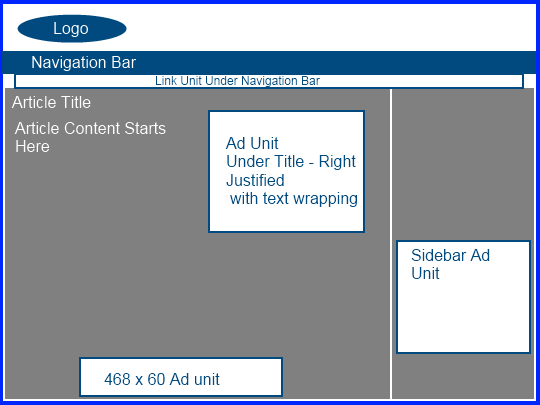
Yes, some themes have the Adsense placement built in, but using plugins and widgets you can essentially put Adsense ads anywhere you want on your site no matter what theme you are using.  (If you want to know how to insert link units under the navigation bar – watch my video post here). This is why I tell people that I literally try to use a different theme for almost all of my niche sites – because I can place the Adsense ads where I want theme very quickly and easily no matter what the theme is.  In addition, using a new theme for each site helps them look more original.

So, in my opinion, much more important that knowing the “best Adsense themes” is knowing the PRINCIPLES of where to place your ads.  I am going to show you 5 quick examples of some different adsense layouts that I have used in the past.  But even more important than that is to try and understand WHY I put the ads where they are.  Then you can literally come up with hundreds of different ad placements, sizes, colors, or other combinations to create your own unique sites and ad placement.

In a nutshell, here are the principles that you need to consider when you are trying to optimize your CTR.

  • Ads “above the fold” will have a better click-through rate than ads below the fold.
  • Place ads near where visitors eyeballs naturally go to in order to get the best CTR (top left, near titles, near site navigation, etc).

Knowing where visitors tend look first on your sites can help you determine where to place ads to get the most attention (if that’s what you are going for of course).  You can find all sorts of “heatmaps” that show you where users look first of spend most of their time on sites.  From looking at these and from my experience, I would say that users tend to look first at the Top Left part of the page (probably because we are all trained to read the text of a book from the top left and then move down).  In addition, big bolded items such as post titles also get attention.  Finally, navigation bars at the top or in the sidebars are also used frequently by people because this is how a traditional site is set up.

Okay, now that you have the principles of where you should be placing Ads for maximum Click through rate, I want to give you some specific adsense layout examples.

Adsense Layout 1

This is a fairly non-aggressive Ad placement that may not get the highest CTR in the world, but still is an overall good site layout.  The ad unit under the article title could be a large rectangle, medium rectangle, or other size.  My favorites to use here are the 300 x 250 or the 336 x 280.  The sidebar unit could also be a number of ad sizes just depending on the width of your sidebar itself.  This will be the case will all of the adsense layouts discussed here – multiple adsense sizes could be utilized with these placements.  These just give you a general idea of where ads could be placed.

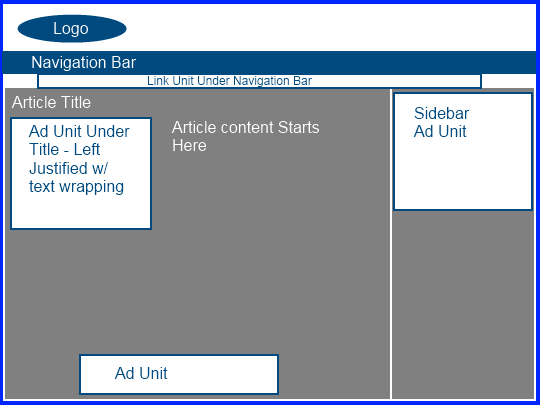
Adsense Layout 2

To be honest, this is a layout that I use alot on my sites.  The primary ad unit within the content is above the fold and gets a lot of clicks because the eyeballs tend to go to the top left of the website.  In addition, the sidebar at the top fits well because its not sitting right next to another ads – its separated by the primary content of the page.

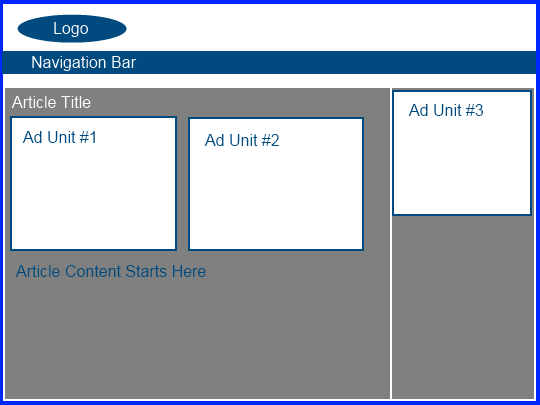
Adsense Layout 3

This is an extremely aggressive adsense layout.  I personally don’t use this layout, but I expect it would get an extremely good CTR.  In addition, I want to point out that another popular layout is one that removes Ad Unit #2.  I often see adsense sites with what is shown above minus ad unit #2 – still agressive, but slightly less so.

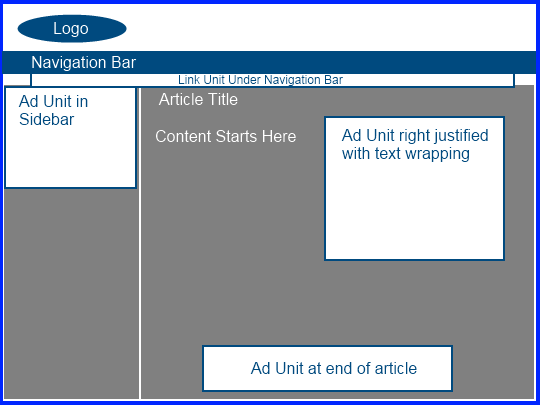
Adsense Layout 4

This layout is very similar to Layout 1 with just the sidebar on the left.  The advantage of this again is that the eyeballs of people visiting your site naturally look to the top left.  Even more so, the sidebar on the left is often where the navigation of the site is located so they will look here to scroll to other pages.  Perhaps they will see an ad that interests them?

Adsense Layout 5

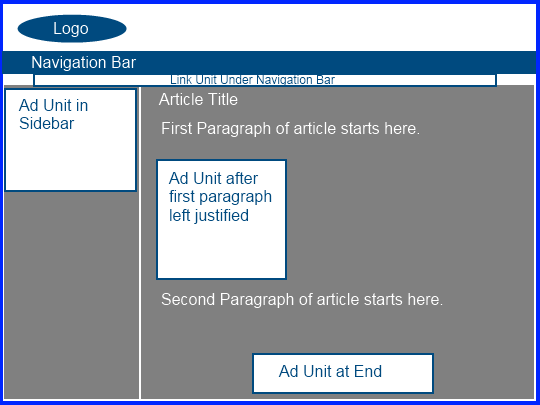
This is an interesting ad layout because it is set up to display the ads after the first paragraph of the article.  So, this is less aggressive than layout 3 for example, but would still get a very good CTR because the ads are still above the fold, in the content, and left justified.  Overall, its still obviously an aggressive ad layout but is certainly still within Google’s TOS.

My Caveats About the Layouts

I literally could have created probably a hundred different layouts of potential places to insert ad units.  I could have created a layout with 2 sidebars with one on the left and one on the right.  I could have given examples of 2 sidebars both on the same side (either right or left); or lots of other site structures.  Then obviously there are hundreds of combinations of ad sizes, exact placement, and options of using 1, 2, or 3 units in the content.  Hopefully these 5 simple ad layout examples will allow you to come up with your own based on the principles I have discussed here.

I also want to point out that you don’t have to use Link units on all your sites under the navigation bar – I just showed that here because it was easier.  If you are not comfortable doing that – then don’t!  Or if you want to use MORE link units than I showed here either in the sidebar or in the content, then by all means go right ahead.  Just be sure to read up on Google’s policies for the total number of ad units that you are allowed to use.

Overall, the purpose here was to show you a few layouts that will get good click through rates.  Most importantly, you need to consider what the strategy or YOUR business is and whether or not a more or less aggressive ad layout is more appropriate.

Your Thoughts

I am interested in hearing what you have to say about these 5 simple layouts.  Are any of these ad layouts that you have used in the past or would consider using on your sites?  What additional thoughts do you have to add about getting optimal click through rates?

http://www.nichepursuits.com/5-simple-adsense-layout-examples-for-increasing-click-through-rates/#

6 Essential WordPress Plugins for Niche Sites

After creating hundreds of niche sites with WordPress, I have tried and tested lots of different plugins.  Some of the these plugins are a lifesaver!  There is no way I could get my sites to perform the way I wanted them to without these very useful free plugins that I am going to discuss.  However, at the same time there are LOTS of other plugins that I could be adding to my sites to perform lots of other functions as well.  But for most basic niche sites, you will not need many more plugins that what I discuss below.

I also want to point out that there is no “magic bullet” plugin that will make your site zoom to the top of Google.  For more details on how to build links and how I have recently gotten my sites to the top of Google, you can read my ultimate link building guide here.  So, I just want to be clear here – this is not a definitive list of plugins and I expect there are others out there that could replace even the ones I have listed.  I am simply listing the plugins that I use on most of my niche sites.  Lots of my niche sites have nothing more than what you see listed below.  Here is a list of those WordPress Plugins along with a brief discussion on each:

List of My Top WordPress Plugins for Niche Sites
  1. All in One SEO Pack – This plugin is a basic search engine optimization plugin that allows you to input a custom meta description and keywords.  You can also specify and optimize your homepage title – which can be very beneficial for ranking in the search engines.  Overall, this plugin helps you to optimize your site for search engines.
  2. Contact Form 7 – A basic free contact form plugin.  This plugin allows you to quickly and easily create contact forms with a number of basic or custom fields.
  3. Yet Another Related Posts Plugin – I currently use this plugin on NichePursuits.com.  You will see the links below every one of my posts that shows “Related Posts”.  These links are generated automatically by the plugin.  I use this plugin on my niche sites as well, to help link to other relevant articles on my site to both provide ease of access for readers and good link structure for all my articles.
  4. Quick Adsense – I now use Quick Adsense to insert Google Adsense ads into my posts.  This plugin makes it very simple to insert Google Adsense that is just below the title of your articles (right or left justified), in the middle of your posts, or at the end.  In fact, you can even select to insert the ads after a specified number of paragraphs, plus a few other options.  Overall, I have found it very effective and easy to use to get my Adsense ads to appear where I want them to within my posts.
  5. ManageWP Worker – This plugin allows you to easily manage and keep plugins and WordPress installations up to date for all your sites.  ManageWP is currently free and is in beta.  However, they will begin charging very soon.  If you have lots of niche sites, its definitely worth looking at though because it allows you to update WordPress and plugins essentially with one click on all your sites.  This is a HUGE time saver over updating all of your WordPress plugins individually on each site.
  6. Date Exclusion SEO – I have not used this plugin extensively but did just recently begin using it on a couple of my sites.  Essentially it allows you to post without any dates.  I have to thank the Justin and Joe over at AdsenseFlippers.com for sharing this one! This plugin helps prevents your posts from getting dated in the search engines.

Overall, these are some of the basic plugins that I use.  Yes, there are lots of other plugins that you could add and perhaps even some that would make different aspects of your site easier to manage.  However, overall you really don’t need alot of plugins to get a site to rank well in Google.  Rankings are much more dependent on the quality of your keyword research and your ability to get links to your sites.

Even so, the ability to add these free plugins to your sites can make optimizing and managing your WordPress niche sites much easier.  I would definitely be interested in hearing your thoughts on these plugins and please share any plugins in the comments below that you like to use as well!

http://www.nichepursuits.com/6-essential-wordpress-plugins-for-niche-sites/#

Clickbomb Defense: 3 Plugins to Prevent Clickbombing

So, in my last post, I explained that I have a new Adsense account and some of the things I am doing differently to keep it.  One of those things I am doing is trying to be less aggressive in my Adsense placement.  Having an extemely high Click Through Rate can be one reason why an account could get shut down.

However, another reason is click bombing.  I don’t think I was a victim of a click bomb attack, but I really don’t know.  A click bomb attack is essentially where a bot or malicious person repeatedly clicks the ads on your site, which can negatively affect your account standing with Google.

I believe that Google does have some measures in place to try and mitigate this from occurring; however, there are still plenty of stories out there of people getting their account shut down for this reason.  One well documented occurrence was on Acme.com here.  Jef was lucky to have Matt Cutts chime in and others to get his account reinstated; most of us humans will never get that kind of attention.

For this reason, I think doing all that you can to prevent malicious click attacks is a good idea.  I’ve taken a look at a few different Click Bomb Prevention plugins, and I wanted to share my thoughts on each of them.

Ad Logger Plugin

First up is a free option called Ad Logger.  This plugin does several things; however, one of those functions is that it can stop showing ads if too many clicks take place in a short period of time.  This is exactly what we are looking for here.

However, the downside is that it only works if you use Ad Injection 1.2.0.4+ to insert your Adsense Ads.  I don’t use Ad Injection, so it doesn’t help me personally.  However, this is worth a look as its free and does what needs to be done to prevent excessive clicking. As they state, “This feature uses JavaScript and cookies, so it won’t function if these are turned off, of if your website readers turn their cookies off.”

The other word of caution is that it has only received 2.5 out of 5 stars and hasn’t been updated in a year.

Who Sees Ads Plugin

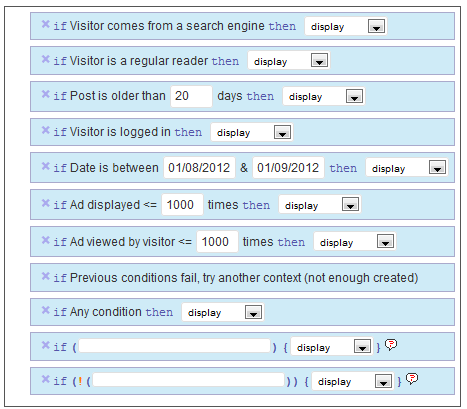
Another free option is the Ozh’ Who Sees Ads Plugin.  This is actually a pretty powerful plugin that gives you all kinds of options for displaying or not displaying your ads.  Here are all the functions that you can set from within the plugin:

So, you can select to only show ads to search engine visitors, or return visitors, or both.  You can also set how many ad views the visitor can have before the ads stop displaying.  This is a great way to prevent click bombing.

Overall, I like the plugin.  It hasn’t been updated in over 2 years, so that’s an issue – but from my tests, it still works.  However, the downside is how to use the code it generates.  Its time consuming and can be difficult to get your ads to display where you want them to.  This could be a deal killer for many people.

So here’s how it works.  Once you set all your conditions (see image above), and input your adsense code (or other advertising code), then you get a snippet of code, such as this: <!--wsa:contentads-->.  Then you have to take that code and insert it into your posts where you want your ads to display.  This can be cumbersome and time consuming, especially if you want your ads to float left or right.  You will have to dive into the PHP code from your wordpress editor if you want to do that on all posts at once.

I tried to insert the code into the Quick Adsense plugin, but the ads did not display – so that option won’t work.

Overall, its a very cool plugin and from my tests it still works even though its old.  But getting your ads to display in the locations where you want them will take quite a bit of time and effort, and may not even be possible if you are unfamiliar with PHP.

Clickbomb Defense Plugin

My final clickbomb prevention plugin was created by a NichePursuits reader, Scott Frye!  Scott contacted me a while ago and gave me some insights into his plugin.  Clickbomb Defense is a plugin that makes it very easy to specify the number of pageviews that each visitor can have before your ads are no longer displayed.

I’ve tested the plugin out pretty thoroughly, and it works great.  In a nutshell, here’s what you need to do once you’ve installed the plugin:

  • Insert your adsense code for and select locations to display ads.
  • Insert a secondary code for when your Adsense is no longer displaying (optional).
  • Specify the number of page views each visitor is allowed to view your ads (this will prevent repeatedly clicking).
  • Specify whether to display ads to all visitors, or only those coming from search engines or other specified sites.

Overall, its pretty simple to use and it works as advertised.  I’ve tested it out without any hassle.  In addition, I’ve exchanged a few emails with Scott (the creator of the plugin) and he’s very responsive and willing to help or listen to suggestions.

To show you how it works, I made a quick video review:

This plugin is not free, but its a very reasonable price.  And you can also use it on an unlimited number of sites, so its truly a one-time purchase.  If you are interested, you can check out the Clickbomb Defense Plugin here.

Yes, these are affiliate links and I will make a commission if you decide to purchase.  If you do, I appreciate the value you’ve placed on my recommendation and the time I’ve put into reviewing these different plugins to make your life a little easier.  This plugin is not required for everyone, and you may be able to get by with the free options that I mentioned as well.

But overall for ease of use and effectiveness – Clickbomb Defense is the best plugin I’ve seen to prevent clickbombing.

Your Thoughts

Overall, I’ve shared a few plugins that I have found that can help prevent clickbombing.  I think each of these plugins has some great features.  What do you think?  Have you used any of these plugins and what’s been your experience?  Do you have any other methods for preventing click bombing?

http://www.nichepursuits.com/clickbomb-defense-3-plugins-to-prevent-clickbombing/#

Adsense Alternatives: My Performance After Google Adsense

imageI recently documented the painful experience I had with getting banned from Google Adsense just a couple of short weeks ago. The response I received from that post was huge with over 400 comments to date…but more importantly I truly felt as though many of you cared about my situation with the loss of income – and that means a lot to me.

As a result of loosing my Google Adsense account, I have been scrambling trying to find some good Adsense alternatives.  Its only been a short while since then, but I wanted to share what I have found that’s working so far, and what some of my plans are down the road for my small niche sites.

First, just to remind everyone how my sites were performing, I want to re-state that I made over $125k last year from Google Adsense. You can watch my 2011 year in review video here.  All of that Google Adsense income came from my niche sites.

On top of that, I obviously made some additional income from sales of Long Tail Pro, and a token amount from affiliate sales on NichePursuits.com. However, since I only started selling the full-version of Long Tail Pro in October of last year, the largest portion of my income was from Google Adsense.

So, it hurt pretty bad to lose that source of income.

However, I have moved on!  I now have alternative ad networks running on all of my niche sites, and they are all at least bringing in some income!  Whereas a couple of weeks ago, they weren’t bringing in anything.

How My Sites are Performing?

So, how are my sites performing with the alternatives to Adsense?  Well, the truth is that I haven’t found anything yet that pays quite as well as Adsense for a General ad network, but I am at least happy to have some revenue back.

Right now, my sites are probably bringing in only 1/3 of what they were bringing in a month ago.

Yes, its not that great BUT I still have A LOT of testing to do and I think I should still be able to bring the income up quite a bit.

Essentially within a couple of days of being banned from Adsense, I went straight over to Kontera and Infolinks (where I already had an approved account) and started placing these contextual links on my sites.  I put Kontera code on about half my sites and Infolinks on the other half of my sites.  This was really done as a stop-gap.  I wanted to start bringing in something as quickly as possible.  Now I am starting to get more creative at looking at alternatives.

In addition on a few of my sites I also tested out Chitika ads, Vibrant Media, GumGum, and SkimLinks. Here is how those ad networks stack up against each other on an eCPM basis.  This tells me how much I am making per 1000 views on my sites.

  • Infolinks eCPM: $10.41
  • Kontera eCPM: $6.37
  • Chitika eCPM: $1.94
  • Vibrant Media: Does not report on an eCPM basis (but I wasn’t impressed with the earnings).
  • GumGum eCPM: $0.44

A quick word about GumGum: this is an image overlay advertising network.  So, this is space that usually does not have any advertising – so this is something that can very easily be added to any other existing in-content advertising that you have.

So, overall Infolinks appears to be the highest paying in-content ad network at this point.  I am going to be moving more and more of my sites over to Infolinks to gain some of this additional revenue.  Overall, they are very simple to implement and use.  The only downside it that you need to get each one of your sites approved.  However, I submitted about 100 sites and they were all approved (minus a couple) within about 24 hours.  So, it wasn’t too bad.

Media.net and SkimLinks

I actually applied to Media.net right away, because I heard so many good things.  However, I have yet to get my account approved.  I waited 10 days (because they say it can take a week for approval), then I emailed them.  They immediately responded and said my application had been denied because my site did not meet the qualifications.  Get this – I applied with NichePursuits.com!  I’m not sure what they are looking for, but I think this is a pretty good site!

However, they did say I could reapply using a different site.  So, I did that a few days ago and still haven’t heard a response.  So, I’m still hopeful to try Media.net out, but they are not real quick at approving my application!

I also have tried SkimLinks out on just one of my sites.  I’m impressed!  Its very easy to implement, like Adsense, and relevant words are automatically turned into affiliate links for various products, services, or information.  Its a pretty cool product.  The best part is that it looks like I made a couple of sales!

Obviously, SkimLinks is not going to be the highest paying way to monetize most sites, but I think it could be a GREAT additional source for many sites.  In fact, you could easily use both Google Adsense (or other networks :) ) and SkimLinks on the same site to maximize the earning potential.

If you are interested in testing out SkimLinks, check it out here.

Future Plans After Google Adsense

Now, I do also want to state that I have spoken with a couple of different CPA networks, and most of my sites just do not seem to be a good fit.  I do have some coupon sites that would work well, but these are very small sites that don’t get much traffic, so overall its not real helpful.

CPA offers tend to perform well for very targeted or specific offers.  Many of my sites are more general and informational, which works great with Google Adsense or other contextual ad networks, but not for specific affiliate or CPA offers.

However, I do still plan on exploring the CPA/Affiliate route to see if I can find a good fit for some of my sites.

Overall, in the future I hope to get approved to Media.net and to test out other networks as well (I’ve applied at a couple others). Unfortunately, I don’t know that its feasible that I will get my income back to where it was with Google Adsense because Google advertisers just pay so much compared to these other networks.  However, I am hopeful to gain a good portion of that income back.  I am going to get the income back from my existing sites as much as possible and may try to sell a few off.

Long term I am looking long and hard at the new sites that I am creating.  Do I want to continue to build lots of small niche sites?  Or do I want to focus on creating a few high quality long term sites?  Or do I want to create some unique products that can help people and then create interesting websites around those products?  These are some of the things that I have to consider as I build my business for the future.  I have not built any new sites in the past few weeks, so I’m taking some time to think things through.  I will be discussing some of the topics in detail over the coming weeks.

Your Thoughts

I would love to hear your thoughts on my review of a few Adsense alternatives.  Do you have other suggestions that I should be trying out?  I look forward to your input!

http://www.nichepursuits.com/adsense-alternatives-my-performance-after-google-adsense/

Can I Have Amazon and Adsense on My Site?

In the past, I have been a big user of Google Adsense. But lately (for obvious reasons) I have been trying a few more experiments with the Amazon Associates program among other things.

Both can be great ways to monetize your site, they just serve slightly different segments.  The Amazon associates program tends to work well on product based sites; while Google Adsense tends to work well with information based sites.

However, the reality is that the topic of many niche sites can be a blend of both information and product based information.  So what should you use, Amazon or Adsense?

The answer is that you can use both if you want to.  I have been asked several times by people wondering: “Can I have Amazon and Adsense on my sites?”  Yes, yes you can.

I have found nothing in either the Google Adsense policies or the Amazon Associates program that states that you cannot combine the 2 ad networks on the same site.  This can be a boost to your income. You can see sites that do this all over the web.  In particular, if you want to see it in action visit Hubpages.com – lots of different “hubs” have both Amazon and Adsense placed on them (along with eBay affiliate links and others).

How to Implement Amazon and Adsense

Here are some guidelines of how I would recommend implementing the 2 ad networks if you decide to try this out.  First, Amazon tends to work better as text links within your content rather than banner ads.  So, don’t put a big 300×250 Amazon Associates banner ad in your content – its less effective (typically).

Instead, link the text within your content to Amazon any time you mention the product or product related phrases.  Also have a call to action near the end asking the reader to read more about the product, or check out the pricing of the product, or any other call to action that will encourage them to click on the link and view the product in Amazon.

Google Adsense on the other hand does work well as Ad units.  I have discussed a few times in the past some of the best Google Adsense ad placements here.  In general, the ads that are in the content and above the fold will perform the best.  I usually recommend a medium or large rectangle unit just below the title either right or left justified.  This is going to be your highest click through rate unit most likely.

How to Increase Earnings

You will need to monitor your earnings to make sure that adding Amazon or Adsense does not decrease your overall revenue.  If having Amazon on your site takes away more from your Adsense earnings than it adds, then don’t do it.  Obviously, you will need to test and monitor your earnings over a few months to determine what works best.  In addition, you should always be willing to test out different layouts to see what gives you the highest click through rate and earnings.

This is how you can increase your earnings.  I’ve personally found that for the most part, its niche specific as mentioned before.  Some keywords will just earn more with Adsense and some may perform better with Amazon.

Overall, there is no reason why you can have both Google Adsense and Amazon on your site at the same time.  You may find that it increases your overall earnings, so test it out!

What are you thoughts?  Have you tested using both ad networks on your sites before?  I’d be interested in hearing your thoughts.

http://www.nichepursuits.com/can-i-have-amazon-and-adsense-on-my-site/#

General Review of Link Building Strategies

I have received lots of questions about what sort of link building strategies should be used for niche websites, so this post is meant to answer some of those questions!  Just to be clear, this probably won’t answer all your questions, this is going to be one of several posts I do on link building.  This is meant to be more of a general overview and I will only touch on a few of the details that will help you get started.

Obviously the link building strategy that you implement should be dictated by how difficult the competition is for your keyword.  I personally only target keywords that have low competition.  Those that target more difficult ones will need to do much more comprehensive link building and other SEO strategies to rank well for their keyword.  I personally have just never had the patience to wait a year or so before I start ranking well for a keyword.  So, these are strategies that work well for me and my business plan of building small niche websites with low competition.  Your strategy may be different.

I also wanted to stress the point that in my business, the keyword choice I make is MUCH MORE important than my link building strategies.  I usually rank well in Google because I pick keywords that do not require very many links; not because I am good at link building.  So, if you are looking for a comprehensive guide on how to rank well for difficult keywords, you won’t find it here, because I really don’t do that.  Again, if you find that you are having a difficult time ranking for a keyword, its most likely due to the fact that you chose a keyword with too much competition; not that you didn’t build the right links.  That’s how I look at it.

I also want to point out that I have tried lots of VARIOUS methods of link building and I am constantly changing how I do things.  So my advice is to just take some of the general principles discussed here and implement as you see fit; although I will offer how I directly implement these in my business.

How Fast Should I Build Links?

When I build a new site, I will ideally submit it to a few social bookmarking like Digg.com and others to get it indexed and get a few links pointing to it within the first couple of days after creation.  Submitting to 5 or so sites is sufficient for this.  I know others that get more aggressive with social bookmarking and I have as well in the past.  So, feel free to submit your site to 20 or 30 social book marking sites if you must, but just don’t overdue it (don’t submit to hundreds or thousands).  Like I said, I might do 5 or so, and that’s it.

After a week or so, I will then ideally submit a new article (never before used on my site or elsewhere) to Ezinearticles.com.  Once accepted, I will then start doing more article marketing, use blog networks, or use other services as discussed below.  Sometimes I will wait 2 or 3 weeks before I do any real linkbuilding.  My advice would be to wait at least a week before you get very aggressive.  Don’t build too many links, too fast.

I might submit articles to a few article directories or order a link package from Matt Laclear (discussed below) and then wait a month or so before I do anything else.  Then if needed I will get more links built and then wait a month and so on.

What Type of Links Should I Build?

I generally do some sort of article marketing or use blog networks.  I have used and like some of the following services for article marketing (please note there are NO affiliate links on this page):

Article Drip Robot

Magic Article Submitter/Rewriter

For blog networks, I have used these services:

My Article Network (currently use the service and like it)

Article Marketing Automation (used the service in the past and really liked it)

SEOlinkVine (did not like, very low distribution rate of articles).

I have also used the services of Matt LaClear on the Warrior Forum.  His service distributes articles to his private blog network.  I have seen some great results from it; although I am trying some other methods to keep costs lower due to the large volume of sites that I have.  You can find one of the link packages that I have used several times right here: Matt LaClear’s Linkbuilding Service

I have used other services as well including hiring lots of different outsourcers.  I have hired link builders from Freelancer.com or Elance.com and given them specific instructions on article distribution or other tasks.  I have also found lots of great packages on the Warrior Forum for hire section right here: Warriors for Hire

How Many Links Should I Build?

My niche sites will never receive more than 200 or so, and that is on the high side for most of my sites.  For example, my top earning site currently has 57 indexed links in Yahoo Site Explorer.  This is fairly typical for my niche sites.  I don’t build a lot of links to my sites, because I don’t need to.  I pick low competition keywords instead.

If you have built more than a couple of hundred links to your site and its been 90 days or so, and you aren’t seeing any movement in the search engines, then most likely you picked a too difficult keyword (according to my small niche site strategy).

I build my links slow.  As discussed above, I might build some links and then wait a month or so before I do anything else to the site.  Obviously you can do it differently, but I have found that there is no need to rush how I fast I build my links.  However, if you are targeting a more difficult niche, you might need more links from more authoritative sources.

Links to Homepage or Deep Links?

Most of my links go to the home page of my websites.  However, I will build some links to inner pages or “deep links”.  I would say its something like 80% of my links go to my homepage and 20% go to inner pages.  It may be as high as 90/10, I’m not really sure.  This just gives you an idea.

Anchor Text?

Using your keyword in the anchor text of the link shows Google that this keyword is more relevant to the site.  So, by making your keyword the anchor text will help you move up the Google ranks.  However, if you use it 100% of the time, this does not look natural.  I would say that I use my keyword as anchor text around 60 to 75% of the time.  The rest are just other related keywords or other terms like “click here” or “read more”.

A Basic Example of the Whole Process

Okay, so here is a quick timeline of what I might do to a new website.  Remember I am constantly doing things differently so this is just a general idea of what might occur.

Day 1 – Complete site

Day 3 – Submit site to 5 to 10 Social Bookmarking sites

Day 7 – Submit an original article to EzineArticles.com

Day 10 – Submit same or other articles to 10 to 20 other article directories (using software or outsourcers)

Day 20 – Order link package from Matt LaClear

Day 50 – If not ranking well yet, order another link package from Matt LaClear or start submitting 4 or 5 articles to services like MyArticleNetwork.com

Day 90 to 120 – Most of my sites will be ranking by this time IF they are going to rank.  If my site is still like on page 10, I will probably give up on the site.  However, if its in the first couple of pages I will decide if its worth the money to build more links.  If the site is making money or if I feel it has great potential to make more, I will build more links and/or add more content to build up the site.  By this point of 90 to 120 days you should basically know if your site is a winner or a loser.  I just don’t worry about the losers for the most part and focus on the big winners.

Anyway, this will just give a quick general overview of how I build links to my small niche websites.  After the 90 to 120 days I don’t do much link building to my sites.  By this time they might be ranking on the first page of Google and I will only build more links if they drop in rank or if I really feel like a site moving from the bottom of page one to the top of page one will make a big monetary difference.

Again, this is a general overview that I hope will answer lots of the questions you might have – but I plan on posting several more times on link building strategies in greater detail.  I’m sure you still have questions, so feel free to ask away below!

http://www.nichepursuits.com/general-review-of-link-building-strategies/#

Niche Site Project Income Report for April 2013

imageWhat started out as an idea to share the niche site building process publicly, has turned into a very interesting case study.  As I recently shared, my niche site (bestsurvivalknifeguide.com) was created in mid-February and quickly rose to the number 1 spot in Google just a week or so ago.

The site currently is bouncing between positions 1 and 3 on Google for its primary keyword “best survival knife”, and is enjoying significant traffic from lots of other keywords as well.  In my full report today, I’m going to share exactly how much traffic the site is getting and where its coming from.

In addition, I will be sharing the total amount of money made, expenses, and much more.

Traffic Stats

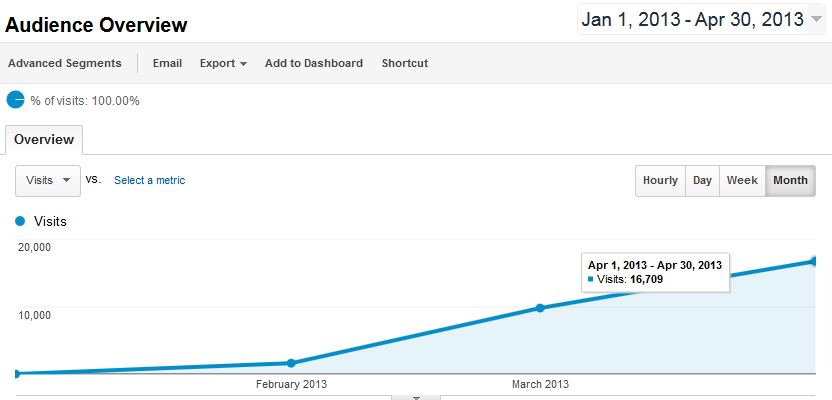
Before I jump right into the earnings of the site, I want to share the amount of traffic coming to the site.  First, here’s a screenshot of how the traffic has grown since it was created (in mid February):

trafficjan-april

Click to Enlarge

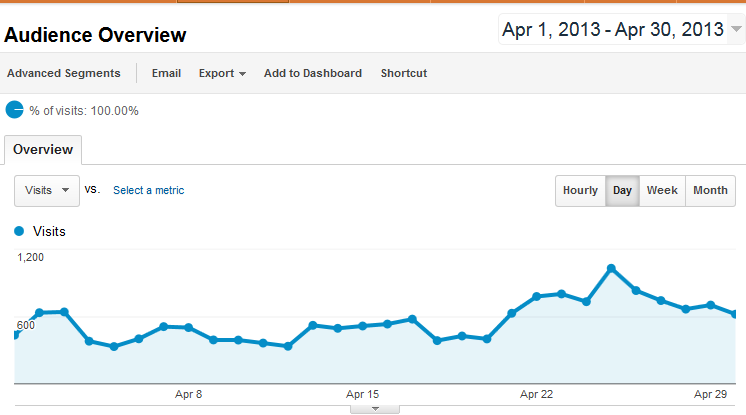
The site has gone from ZERO visits in January to 16,709 visits in April!  That really is some amazing growth.  Now here is a screenshot of the Google Analytics for the month of April.

apriltraffic

Click to Enlarge

You will notice around April 21st when my site started bouncing up to position 1 and 2 on Google – and the traffic has consistently been higher since then.  Also, you will notice some additional that the traffic is pretty high and there are some additional peaks.

This is basically explained because of people that read NichePursuits.com checking in on my site frequently and in particular when I publish a new blog post here.  As a result, a little over 34% of the traffic coming to the site is Returning visitors.

So, really around 66% of the visitors to the site are NEW visitors, which is really still quite good.  (And even normal niche sites will have a certain amount of “returning visitors”, so the entire 34% is not all readers of my blog here).

Where is the Traffic Coming From?

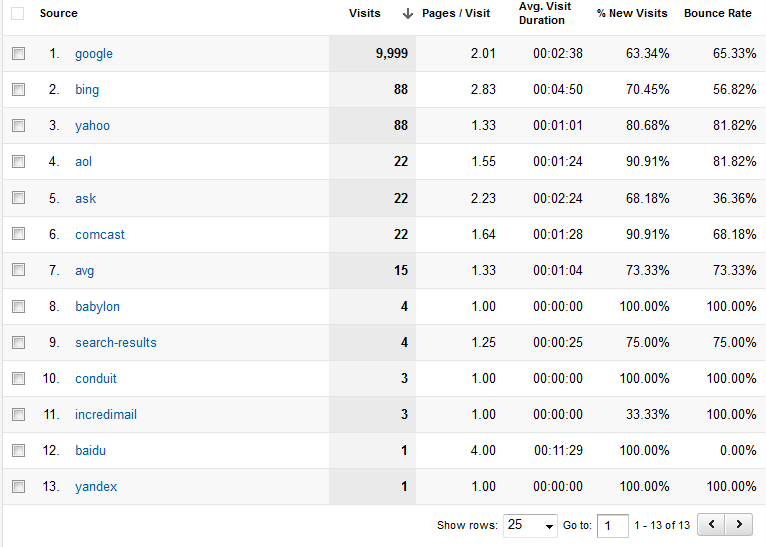
Most of the traffic to the niche site is coming from Google.  However, a few other search engines are doing their best to send me a little bit of free traffic.  Here’s the breakdown (I think I’ll keep focusing on Google :) ):

searchsourceapril

I didn’t do anything to get search traffic from these other search engines.  I only did what I’ve already laid out extensively in this case study.

Approximately 61% of the traffic is coming from search engines, and about 33% is coming from direct traffic (a large portion of this direct traffic is probably my blog readers here).  Here’s the pie chart:

trafficsourceapril

Keywords Used to Find My Site

Now we come to my second favorite part of this report (my favorite is the income), seeing all the keywords used to find my site!  I am actually surprised at the HUGE variety of keywords being used to find my site.  Sure, I expected a lot of different long tail keywords based on the various articles produced for the site; however, I’m impressed with the amount of keyword queries that are being used to find my site.

I did all my research for the primary and secondary keywords using my keyword research tool, Long Tail Pro.

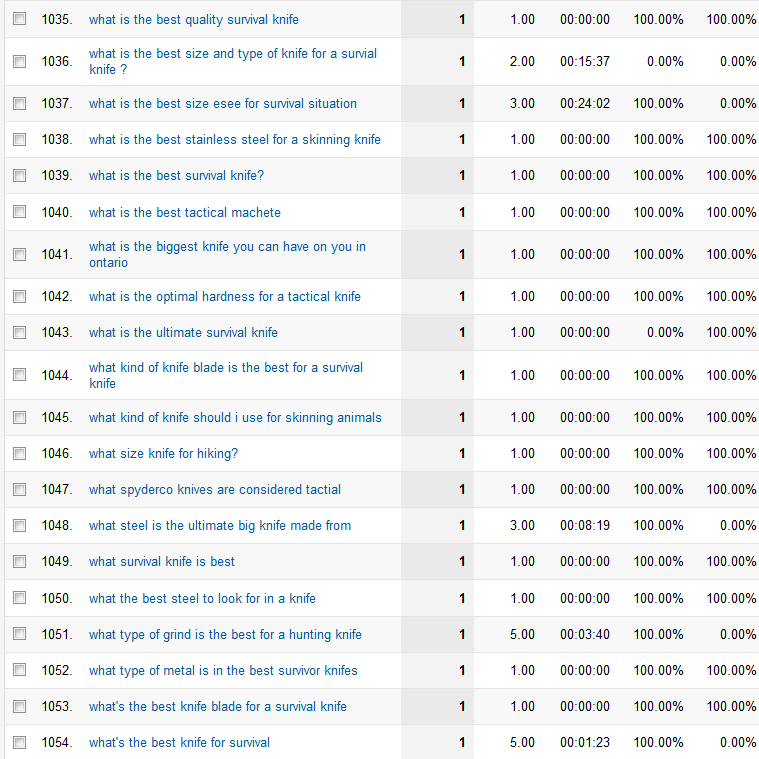
Here’s a couple of screenshots to show the most popular keywords and some of the longer tailed keywords:

keywordsapril1

keywordsapril2

In total, I received search engine traffic from 1,083 search queries in the month of April.  The term, “best survival knife” was by far my biggest search query, but you can see in aggregate, that MOST of my traffic is coming from other keywords.  This is normal and should be expected.

However, you will also notice that many of the keywords include either “best” or “survival knife”.  This is one reason why its important to focus on one primary keyword to start because you get both the searches for that exact keywords and lots of related searches.  Then I am clearly getting lots of searches to my additional content on the site (not just my primary article).

Income For April 2013

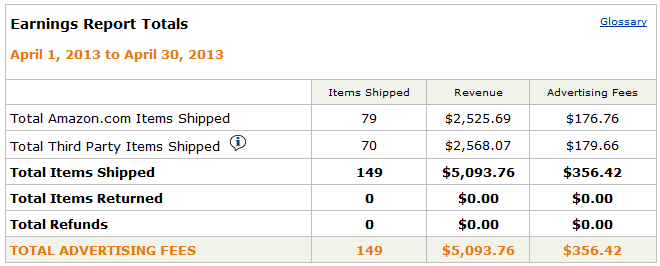
For the month of April, I continued to exclusively use the Amazon Associates program to monetize my site.  The income for April was $356.42! Sweet!!

amazonapril

To remind you, the earnings in March was $83.86 (see report here).  The primary reason for the month to month increase in revenue is due to the increased traffic.

So, overall, the site has made me $440.28.

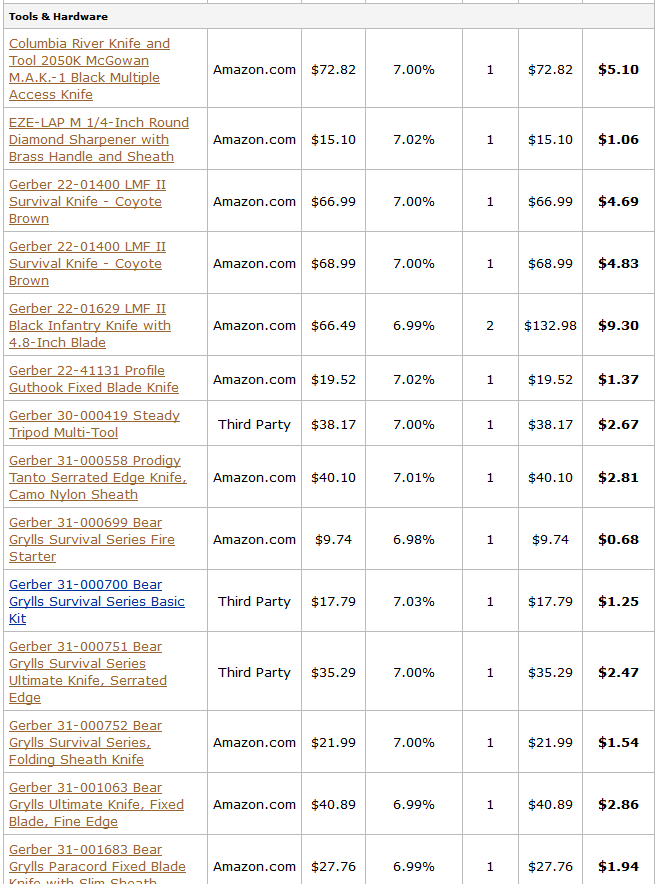
Also, out of the 149 items purchased, most of them were knives or very similar camping/survival items.  I thought some of you would find it interesting to see some of the items purchased, so here’s a couple of screenshots of where my commissions came from:

aprilsales1

aprilsales2

I am using the EasyAzon plugin to insert and manage the Amazon affiliate links on my site.  The plugin makes it much quicker to find and insert links as well as change certain settings (like cloaking, ad previews, and more).

Overall Expenses

Seeing the income is nice, but its also important to take a look at the expense side of things.  I’ve detailed previously here what my expenses had been up to that point; however, I am going to cover everything here.

  • Domain name with Privacy: $10
  • Hosting with Bluehost: $17.85 (3 months at $5.95/mth).  However, I also can share this hosting account with other sites, so the true expense is spread out with lots of sites.
  • Articles: $392. There are currently 22 articles on the site. (So, that’s an average of $17.82/article…yes this is more than I usually pay).
  • Link Building: $244. About $25 for a VA to submit my site to web directories; then $219 for link building service through LayeredLinks.com.  A big part of the influence for my overall link building strategy came from the Link Building course called Point Blank SEO.  I highly recommend it if you want to do your own link building or learn more about how a good link building strategy should work.
  • Graphics: $50
  • I am using the Niche Website Theme (which I created) on my niche site.  Since I already own the product, I’m not putting it as an expense.  However, its currently being sold at a discount right here.

So, in total, I’ve spent $713.85.  Subtracting my overall income leaves me with a net loss of $273.57.  If this site does as well as it did in April, I will turn a profit in May.  And I actually expect that the site will earn more in May than April because it should have a full month near the top of Google.

My expenses will also be significantly less as many listed above were one-time costs.  I may spend another $100 or so on articles in May, but that should be about it for the expense side.  So, if I hit my goal of earnings $500/mth starting in May; I will have a passive income stream of $500 each month on a total investment of less than $900!   That’s a really high Return on Investment obviously.

Plans Going Forward

Overall, I am SUPER happy with the way this niche site has turned out.  The site is doing very well, and I hope the success continues for a long time to come.  My plans going forward are fairly simple at this point.  I will continue to add between 5 and 10 articles to the site in May, and possibly in June as well.  Depending on how the site is doing, I will re-evaluate in a month or so if I should ramp up the content even more or if I should just leave the site as is.

I have been building a small email list, but haven’t quite figured out what to do with it yet.  I have a 4 part auto-responder series that is likely bringing people back to the site, but I’d like to explore some affiliate opportunities.  Hopefully in May, I can find a good fit.  I currently have 67 subscribers on the survival knife email list.  I could likely add a ton more by adding a splash page or pop up.

Your Thoughts

As always, I want to be as open about this case study as possible.  I think that I’ve provided some valuable stats, screenshots, and more on this income report that can help you evaluate what’s going on with my niche site. However, I also know that you may have additional questions that you would like clarification on…I’m here for you!

So, please leave any thoughts or questions that you might have below.

http://www.nichepursuits.com/niche-site-project-income-report-for-april-2013/#


Copyright @ 2013 Diggin for Cash.